


PanunGPT
Your AI. Your Machine. Your Way.
A local-first AI workstation for Windows. Chat, coding help, document analysis and image understanding, running on your own computer through Ollama. No account, no cloud backend, no telemetry.
Needs Windows 10 or 11 (64-bit) and Ollama with at least one model.

Version 1.0.0
Windows 10 or 11, 64-bit (x64)
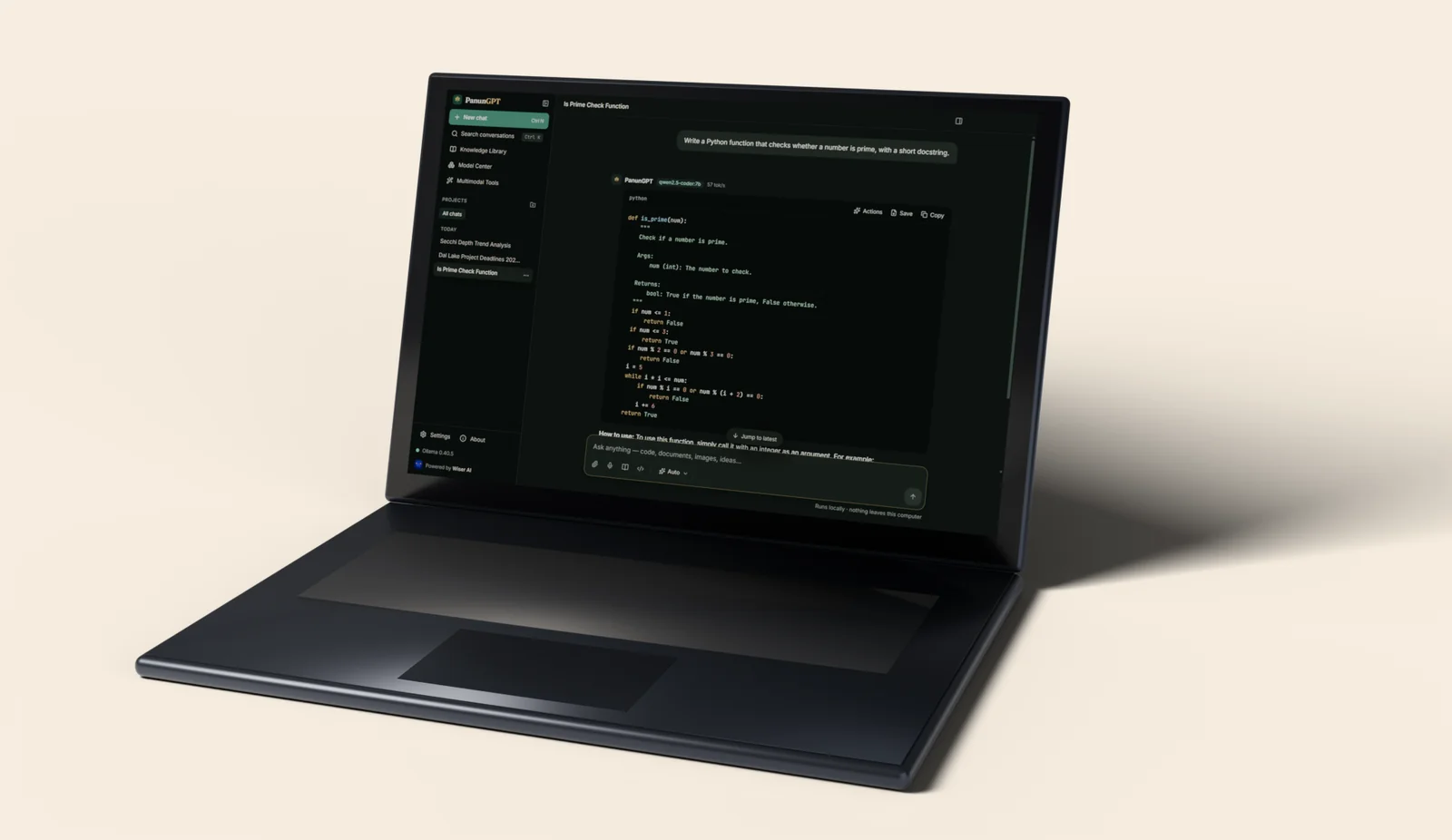
The real application.
Every screenshot is the actual app running against local Ollama models.
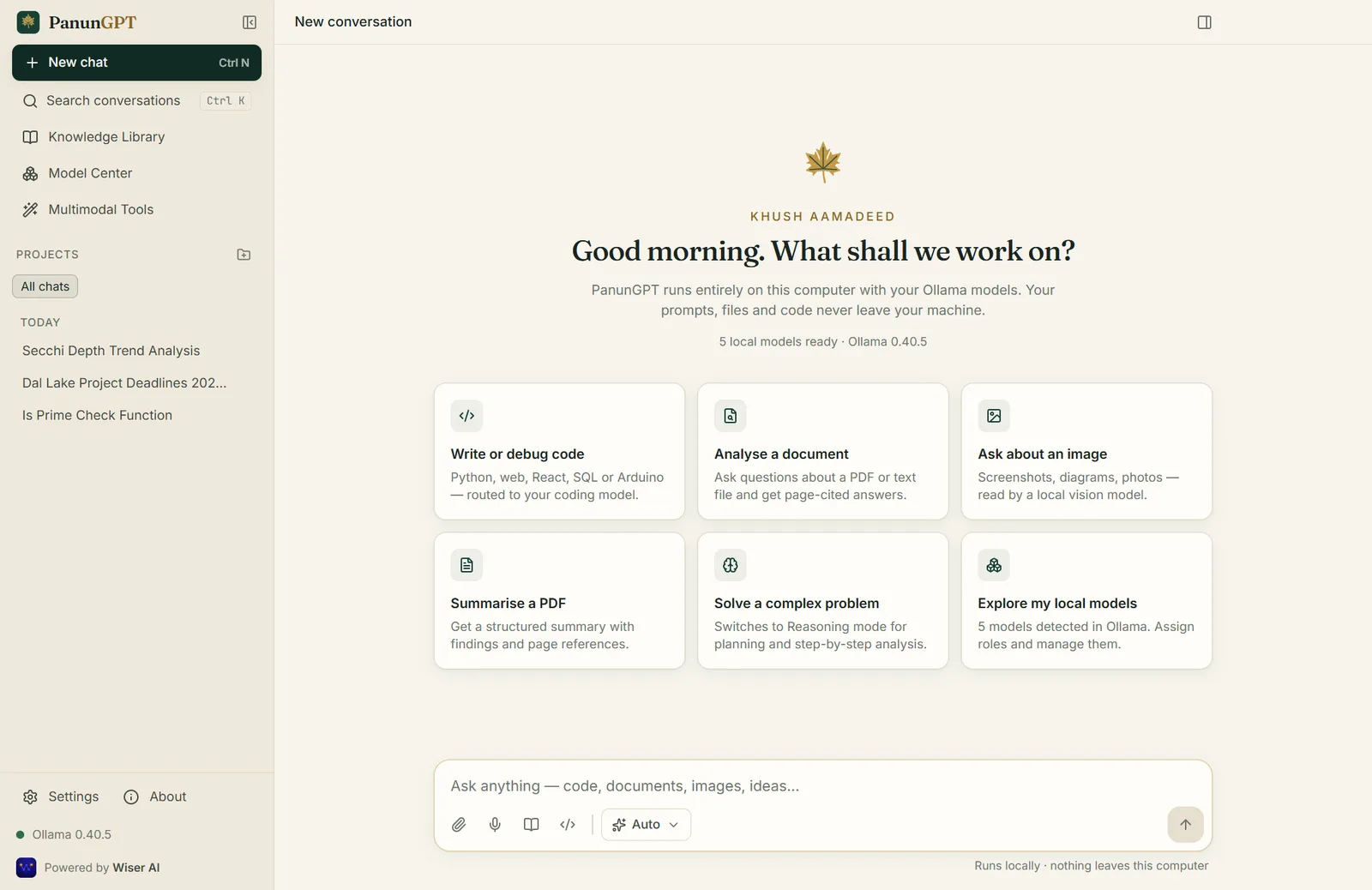
The PanunGPT welcome screen in light mode: “What shall we work on?” with six starting points, including writing code, analysing a document and asking about an image.
One assistant, several local models.
PanunGPT (from the Kashmiri panun, “one's own”) is a desktop AI assistant that runs on your own machine. You talk to one assistant, and behind the scenes it picks the right local model for each request: a reasoning model for planning, a coding model for code, a lightweight model for quick answers and a vision model for images.
Inference runs locally through Ollama, so prompts, files and answers stay on your computer. Once models and optional components are installed, it works offline.
Attaching a file does not mean a model can read it, so PanunGPT checks capabilities instead of assuming them. Images go only to a vision model; scanned PDFs need OCR; when something is missing, it says so and shows how to set it up.
Built for
- Developers building websites, Python applications and Arduino projects
- Students and researchers working with PDFs and papers
- Anyone who wants a capable assistant without sending their data to a third party
Privacy, by design
- Stored on your computer
- Conversations, settings, files you attach and the document index live in %APPDATA%\PanunGPT. Logs never contain prompts, answers or document text.
- Inference stays local
- Model calls go only to the Ollama endpoint you configure, which is this computer by default.
- Nothing collected
- There is no telemetry, analytics or crash reporting, and the telemetry setting cannot be switched on.
- Internet only when you ask
- Used only when you download a model or install an optional component. PanunGPT shows the source and size first and verifies each file's SHA-256.
Features, and what each one needs.
Some capabilities need a compatible model or a one-time optional component. Planned items are not in this release.
Local AI chat
- Streaming answers from Ollama models running on your computer
- Stop closes the stream so the GPU is released immediately
- Markdown, tables and syntax-highlighted code, with copy controls
- Regenerate, edit and resubmit, and automatic conversation titles
Model routing
- Auto, Fast and Reasoning modes, or a fixed model of your choice
- Routing by task, complexity, attachments and what is installed, with no extra model call
- A planner model plans larger builds and a coding model implements them
- Model badges, a one-line reason and load time for every answer
Coding
- Explain, debug, refactor, write tests and convert code between languages
- Save code to a file you choose. Generated code is never executed
- Side-by-side diff view for edits to existing filesPlanned
Documents and knowledge
- Local PDF and text extraction, with answers that cite file and page
- A Knowledge Library of PDFs, Markdown, text and code you choose to add
- Semantic search across documentsOptional setup
- OCR for scanned PDFs (English)Optional setup
- Map-reduce summaries of very long documents and table extractionPlanned
Images and audio
- Image understanding with a vision-capable modelOptional setup
- Speech-to-text with whisper.cpp (English)Optional setup
- Read aloud with the voices built into Windows
Your data and the desktop
- No account, no cloud backend and no telemetry
- Search, pin, organise into projects, export and set retention
- Light, dark and system themes, keyboard shortcuts, drag and drop
- Code signing and an auto-update channelPlanned
Before you download.
PanunGPT runs models through Ollama, which you install separately. Without Ollama and at least one model, it opens a setup screen instead of a chat.
Required
- Windows 10 or 11, 64-bit
- Ollama, installed and running
- At least one chat model pulled into Ollama
Models
Scroll the table sideways to see every column.
| Model | Used for | Download | Need |
|---|---|---|---|
| qwen2.5:3b-instruct | Lightweight assistant | 1.9 GB | Recommended |
| qwen2.5-coder:7b | Coding | 4.7 GB | Recommended |
| deepseek-r1:7b | Reasoning and planning | 4.7 GB | Recommended |
| qwen2.5vl:3b | Image understanding | 3.2 GB | Optional |
| nomic-embed-text | Semantic document search | 274 MB | Optional |
Recommendations are for a computer with an 8 GB GPU, which is what the release was verified on. Smaller models work on less capable hardware, and models run one at a time.
Optional components
- Speech-to-text: whisper.cpp with the Whisper base.en model, about 156 MB, installed from inside the app
- OCR: Tesseract English data, about 3 MB, installed from inside the app
Download PanunGPT.
The public download link is being set up. Until it is, ask for the installer and we will send you the official release, with the checksum below so you can verify it.
The installer is not code-signed. Windows SmartScreen may show “Windows protected your PC”. It is not signed or verified by Microsoft. Check the SHA-256 checksum first; if it matches, choose More info, then Run anyway.
Release information
- Version
- 1.0.0
- Released
- 17 October
- File
- PanunGPT-Setup.exe
- Size
- 139.5 MB (139,496,786 bytes)
- Platform
- Windows 10 or 11, 64-bit (x64)
- Installer
- NSIS installer, per-user, no administrator rights needed
- Code signing
- Not signed
- Licence
- Proprietary, © Wiser AI
SHA-256 checksum
3f256014165325565604e5feb5167fb56d86a58078ef7350fca79700c9430ad7Verify in PowerShell with Get-FileHash .\PanunGPT-Setup.exe -Algorithm SHA256. The two values must match exactly.
PanunGPT is proprietary software developed by Wiser AI. Its source code is kept private; this page and its installer are the public release.
Installation guide.
Six steps, most of them one-time. PanunGPT installs for your user account and keeps your data in %APPDATA%\PanunGPT.
- 1
Install Ollama
Download Ollama from ollama.com and install it. It runs in the system tray.
ollama.com/download(opens in a new tab) - 2
Pull at least one model
Open PowerShell and pull a chat model. The three recommended models cover quick answers, coding and planning.
ollama pull qwen2.5:3b-instruct
ollama pull qwen2.5-coder:7b
ollama pull deepseek-r1:7b
- 3
Download and verify PanunGPT
Download PanunGPT-Setup.exe, then check its SHA-256 matches the value published on this page.
Get-FileHash .\PanunGPT-Setup.exe -Algorithm SHA256
- 4
Run the installer
It installs for your user account, with no administrator rights needed. Choose a folder and whether you want a desktop shortcut.
- 5
Get past SmartScreen if it appears
The installer is not code-signed, so Windows may show “Windows protected your PC”. If the checksum matched, choose More info, then Run anyway.
- 6
Open PanunGPT
It finds Ollama at 127.0.0.1:11434, discovers your models and assigns their roles. Review them in Model Center, and add speech or OCR in Multimodal Tools.
Questions and troubleshooting.
Something else? Ask us.
Is PanunGPT really offline?
Once Ollama, your models and any optional components are installed, yes. Installing those needs the internet once. PanunGPT itself has no server to talk to.
Why does Windows show a SmartScreen warning?
The installer is not code-signed yet, so Windows does not recognise the publisher. It is not signed or verified by Microsoft. Check the SHA-256 checksum on this page, then choose More info and Run anyway if it matches. Code signing is on the roadmap.
Which models should I start with?
qwen2.5:3b-instruct for quick answers is enough to begin. Add qwen2.5-coder:7b for code and deepseek-r1:7b for planning if your hardware allows. PanunGPT discovers whatever you install and never assumes a model is there.
Ollama is not detected. What now?
Start Ollama from the system tray and click Retry. If it listens somewhere other than 127.0.0.1:11434, set the endpoint in Settings, Models.
A model fails to load or runs out of memory.
Lower the maximum context window, choose to unload models after every response, unload other models in Model Center, or switch to Fast mode.
How do I uninstall it and remove my data?
Uninstall from Windows Settings, Apps. Your data is kept so a reinstall picks it up; delete %APPDATA%\PanunGPT to remove it completely.
Is the source code available?
No. PanunGPT is proprietary software developed by Wiser AI, and its source repository is private. The installer on this page is the public release.